 OSPO Guide
Archiving Repositories
Repositories that are no longer maintained must undergo an end-of-life archival process. When a repository is archived, we convert it to read-only to preserve its history; issues, pull requests, code, labels, milestones, projects, wiki, releases, commits, tags, branches, reactions, code scanning alerts, comments and permissions, all become read-only.
Archival of a repository is not a failure, and it is not a “bad” thing. We archive our repositories to communicate clearly to and manage the expectations of current and prospective users and contributors. A unique function of a Federal public sector open source community is that we serve not only as contributors, but as Stewards. Projects are not valuable solely based upon the utility of their results or outputs, they reflect the record of our progress. Archives provide transparency, accountability, and attribution. Archives build trust, reduce duplicate work, and reduce risk. The work we do today, saved in our archived repositories, may allow historians to more accurately and completely understand how our work contributed to the story of our Nation.
Assessing Archival Candidacy
The decision to archive a repository can be due to both technical and nontechnical factors:
- Agency goals have changed
- Key person or team that headed the effort leaves
- Project performance metrics (e.g. participation, usage, adoption, updates) are declining based on your latest user data
- Maintenance status has changed (e.g. code is no longer being patched or updated by the community to resolve vulnerabilities)
Using metrics to evaluate project health
We monitor various types of metrics as indicators for project health, which are used to determine whether a repository should be archived.
- Development Activity
Assessing repository activity based on how recently key actions occurred within certain period of time
| Metric | Description | Value: Provides insight into… |
|---|---|---|
| Time Since Last Issue Opened | Measures how long ago the last issue was opened in the repository. | Activity from external contributors and forks. |
| Time Since Last Issue Closed | Measures how long ago the last issue was resolved and closed. | Maintainer activity, addressing community feedback and/or roadmap tasks. |
| Time Since Last PR Opened | Measures when the last pull request was opened. Indicates how recently a pull request was submitted for review. | Activity from external contributors and downstream forks, maintainer activity |
| Time Since Last PR Merged/Closed | Measures time since the last pull request was merged or closed. | Maintainer activity |
| Time Since Last Formal Release | Measures time since last official release | Maintainer activity - shows release schedule, following development roadmap |
| Time Since Last Direct Commit | Measures how recently a direct commit was pushed to the repository | Development activity |
Note: These metrics are intended to capture development activity performed by human developers. Automated tools such as GitHub Actions bot and Dependabot are excluded, since their activity reflects scheduled/triggered automated updates rather than active human development.
-
Reuse metrics via forks
Analyzing forks and its activity helps us understand how often the project is being used by its downstream user and developer community.- Number of Forks
- How many forks have been created?
- Activity within Forks
- Have technical commits been pushed to the forks within $THRESHOLD time?
- Popularity
- Do the number of stars of a downstream fork exceed stars of the upstream repository?
- Number of Forks
-
OpenSSF Criticality Score
Criticality Score measures the importance and influence of an open source project using various factors and weights.Repositories that fall below a defined criticality score threshold are considered candidates for archival.
Learn more at:
-
Repository Contents
Sometimes organizations maintain repositories that are blank and/or have no active development going on.Repositories that are completely empty or only contain README.md/other documentation files can be considered suitable candidates for archival.
The GitHub OSPO created a GitHub Action to scan your GitHub organization for empty repositories: https://github.com/github/empty-repos
Status Determinations
Based on analysis of the metrics, we classify repositories using 5 status determinations:
- Active
This project is under active development and has an active user base. All activity metrics are within the $THRESHOLD_TIME, forks are active, and criticality score exceeds the $THRESHOLD_SCORE.
- Dormant
Project upstream and downstreams are inactive. All activity metrics are within the $THRESHOLD_TIME, forks are inactive, and/or criticality score is below the $THRESHOLD_SCORE.
- Dormant Downstream
The project may be under active development, but does not have an active downstream user or developer base (no downstream forks and/or no commits to downstream forks). Tier 1 repositories typically fall under this category since they are one time release projects with no expectation to be worked on afterwards.
- Dormant Upstream
The project may have active users, but the core developers or upstream team is inactive. Forks are being regularly committed to and sometimes downstream forks surpass usage and popularity from its upstream counterpart (stars of fork > stars of repo)
- Stable
Upstream activity may be below thresholds, but downstream activity indicates active usage or forks. Examples include client repositories such as ab2d-sample-client-python where the client is stable and accommodates changes when there are AB2D API changes and/or dependency version updates for maintenance. Otherwise, no new feature work is occurring – the only work being done is to ensure it is stable or backwards compatible given external changes.
Criteria for Determination
| Status | Open PRs | Merged/ Closed PRs | Push to repo | Push to forks | Open issues | Closed issues | Criticality Score | Is repo empty/ README only? |
|---|---|---|---|---|---|---|---|---|
| Active: This project is under active development and has an active user base | ✅ | ✅ | ✅ | ✅ | ✅ | ✅ | Above $THRESHOLD _SCORE | Has content |
| Stable: Upstream activity may be below thresholds, but downstream activity indicates active usage or forks. Usually automated commits by dependabot and no commits by humans | ✅/❌ | ✅/❌ | ✅/❌ | ✅ | ✅/❌ | ✅/❌ | TBD: Consider using the standard deviation of threshold | Has content |
| Dormant Downstream: Project may be under active development, but does not have an active downstream user or developer base | ✅ | ✅ | ✅ | ❌ | ✅ | ✅ | ❌ Below $THRESHOLD _SCORE | Has content |
| Dormant Upstream: Project may have active users, but the core developers or upstream team is inactive. Stars of fork > Stars of upstream repo | ❌ | ❌ | ❌ | ❌ | ✅ | ❌ | ✅ Above $THRESHOLD _SCORE | Has content |
| Dormant: Project upstream and downstreams are inactive | ❌ | ❌ | ❌ | ❌ | ❌ | ❌ | ❌ Below $THRESHOLD _SCORE | Empty OR README-only |
Tool: archival-identifier
To put into practice the concepts explained above, the CMS OSPO created the archival-identifier tool: a GitHub Action that scans a GitHub organization for repositories that are suitable candidates for archival, based on the metrics and methods above. By measuring development activity, assessing reuse through forks, and calculating OpenSSF criticality score, data can provide a status determination of the current state of the repository. The results are published as an issue to the repository with a table of each repository and their metrics, along with its status determination.
Using these issues, project teams can assess and discuss the results, and select repositories to archive.
For more information on using this action for your organization’s software inventory, visit the archival-identifier GitHub Actions Marketplace page.
Repository Archival Checklists
To prepare a repository for archival, complete the tasks below to perform a thorough review of the repository.
A complete list of all tasks described below are complied in checklists found here.
For all tiers
Review Metadata
In code.json:
Enabling archived mode in the automated-codejson-generator GitHub Action handles this work.
Review Repository
Repository Documentation can provide explicit statements about the status of a project or community. Communicating clearly, whether the project is active or inactive, is important.
Update Repository Documentation
-
- Sample Text:
"This project is now archived and no longer actively maintained. It has been archived to retain its contents for reference. Feel free to explore and fork the repository, but please note that updates or support will not be provided."
- Sample Text:
Issues
Repository Issues serve as a type of record of the decision making processes of a project, and can provide visibility into project history and intended or recommended future development. Deleting them outright is not recommended.
Repository Access
Perform a lightweight security review
Other
For Tiers 2-4
Review Repository
Pull Requests
Repository Pull Requests serve as a type of record of the decision making processes of a project, and can provide visibility into project history and intended or recommended future development. Deleting them outright is not recommended.
Documentation
Communications
Outbounding
Tool: repo-sunsetter
repo-sunsetter is a repository-level GitHub Action developed by the OSPO to prepare repositories for archival. It implements the work described above by:
- Adds an archival notice to the README.md to inform users about the state of the repository
- Updates project metadata by marking project as archived in code.json
- Files an issue containing the archival checklist based on the repository's maturity model tier.
For more information on using this action for your team's / organization's repository, visit the repo-sunsetter GitHub Actions Marketplace page.
Archiving a repository on DSACMS GitHub
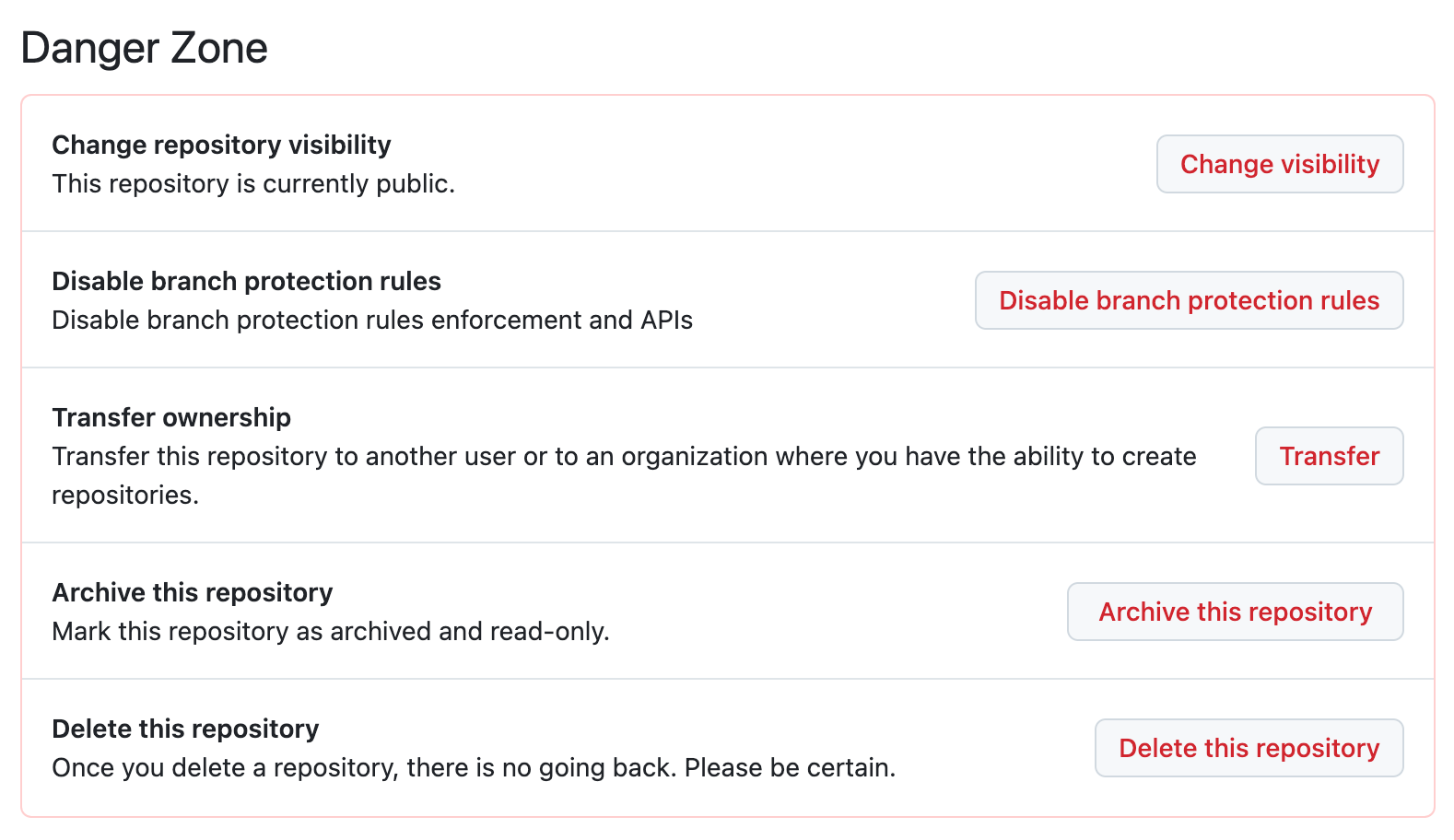
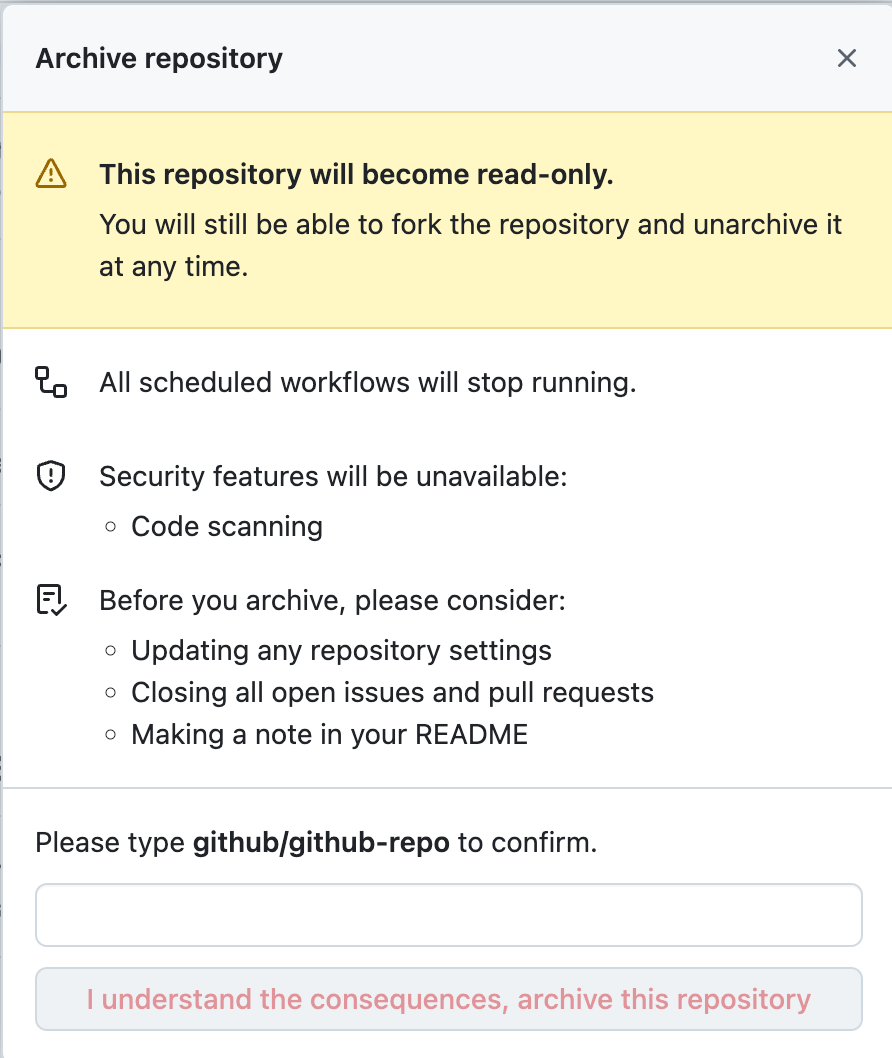
In the repository's settings page, click on the Archive this Repository button located in the Danger Zone.
| Step 1 | Step 2 |
|---|---|
 |
 |
Archiving a repository on CMS-wide GitHub Organizations
To archive a repository on any CMS-wide GitHub Organizations, please submit a ticket to the respective IT Help Desk. The ticket visibility will be private by default, so you will need to share the ticket directly with project leads to obtain approvals.
CMSgov
Submit a request to the CMS Web Help Service Desk: https://jira.cms.gov/servicedesk/customer/portal/1/create/11
CMS-Enterprise
Submit a request to the 18F only, CMS Enterprise Agile Tools Service Desk: 18F only, https://jiraent.cms.gov/servicedesk/customer/portal/4/create/183

